

Diabetes is a chronic condition that affects how your body processes glucose, a type of sugar that is the main source of energy for your cells. When you have diabetes, your blood sugar levels can become too high or too low, which can lead to serious health problems.
That’s why it’s important to track your diabetes data, such as blood glucose readings, insulin doses, food intake, exercise, and other factors that can affect your blood sugar levels. Tracking your diabetes data can help you manage your condition better and prevent or delay complications.
But how do you track your diabetes data effectively and conveniently? Fortunately, there are many apps and devices that can help you do that. This review is based on some of the best apps and devices for tracking your diabetes data based on their features, usability, accuracy, cost, and other criteria. We will also provide some tips and suggestions for choosing and using apps and devices for tracking your diabetes data.
1. BlueStar Diabetes: Best Overall App
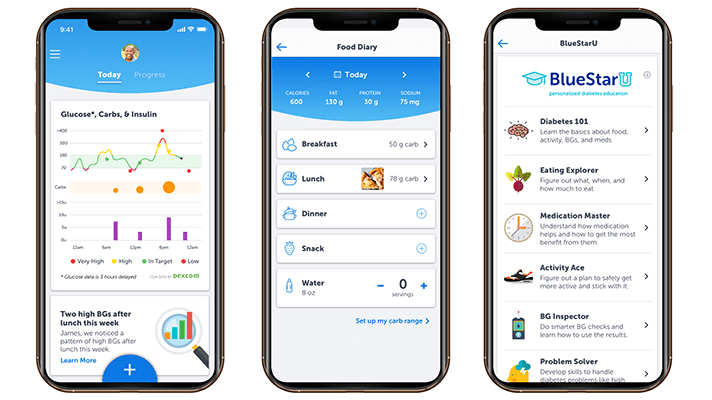
BlueStar Diabetes is one of the best apps for tracking your diabetes data because it offers real-time coaching, medication reminders, blood glucose and carb tracking, lab results, health data sync, and healthcare team connection. BlueStar Diabetes is more than just an app; it’s a digital health program that is designed to help you achieve your diabetes goals.
BlueStar Diabetes is only available via access code from employers, health systems, or health plans. You can check if you are eligible for BlueStar Diabetes by visiting their website.
BlueStar Diabetes has received FDA approval and ADA endorsement, which means it meets the highest standards of safety and effectiveness. BlueStar Diabetes has also received positive feedback from users who have reported improved blood sugar control, reduced A1C levels, and increased confidence in managing their diabetes.
2. Medical ID: Best App for Emergencies
Medical ID is another app that can help you track your diabetes data, especially in case of emergencies. Medical ID allows you to create a personalized profile with your medical conditions, allergies, medications, emergency contacts, and other information that can be useful for first responders or medical professionals.
Medical ID can be accessed from the lock screen of your phone without unlocking it, which can save precious time in critical situations. Medical ID can be helpful for people with diabetes who may experience hypoglycemia (low blood sugar), diabetic ketoacidosis (high blood sugar with ketones), or accidents that can affect their blood sugar levels.
Medical ID can also alert your emergency contacts if you need help or if you have activated an SOS feature on your phone. Medical ID has received positive reviews from users who have appreciated its simplicity, reliability, and usefulness.

3. Fooducate: Best App for Nutrition
Fooducate is another app that can help you track your diabetes data, especially when it comes to nutrition. Fooducate allows you to scan food labels, grade foods based on their nutrition quality, track calories, carbs, and other nutrients, and provide healthy food recommendations.
Fooducate can help you make better food choices and improve your diet, which can have a significant impact on your blood sugar levels. Fooducate can also track other aspects of your health, such as weight, activity, sleep, mood, and more.
Fooducate can also connect you with a community of other users who can offer support and advice. Fooducate has received positive feedback from users who have reported weight loss, improved eating habits, and increased awareness of food ingredients.

4. Glucose Buddy: Best App for Integrated Tech
Glucose Buddy is another app that can help you track your diabetes data by integrating with various devices and platforms. Glucose Buddy allows you to log your blood glucose readings manually or automatically via Bluetooth devices, such as glucose meters, insulin pumps, CGMs, and more.
Glucose Buddy also allows you to set reminders and alerts, generate reports and charts, and sync your health data with other apps, such as Apple Health, Google Fit, and more.
Glucose Buddy can also track other aspects of your health, such as medications, food intake, exercise, blood pressure, weight, and more. Glucose Buddy has received positive feedback from users who have praised its compatibility, customization, and functionality.

5. Diabetes:M: Best App for Remote Monitoring
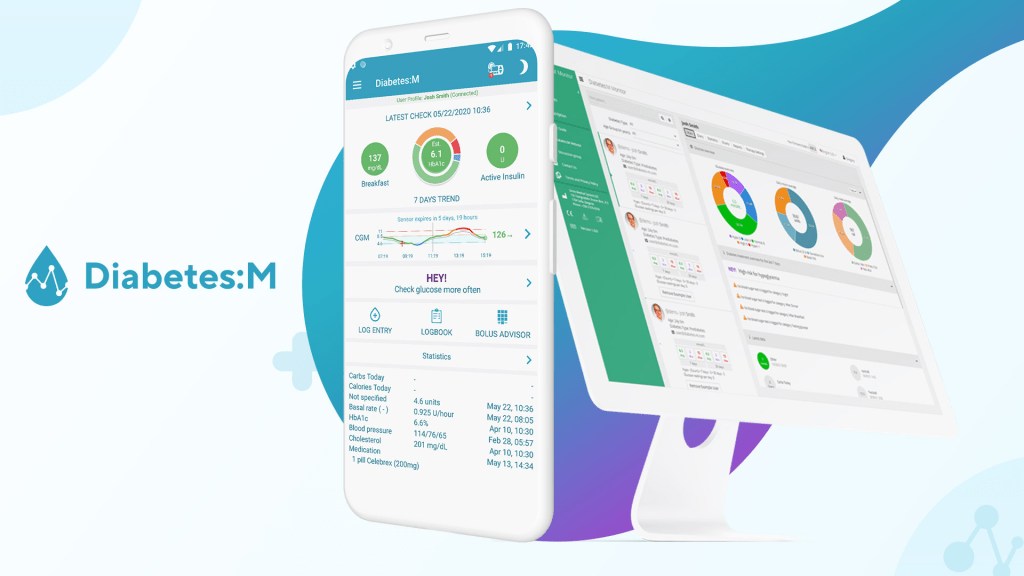
Diabetes:M is another app that can help you track your diabetes data by enabling remote monitoring. Diabetes:M allows you to share your data with your doctors or caregivers via email or cloud services, which can help them monitor your condition and provide feedback.
Diabetes:M also allows you to calculate insulin doses based on carbs and blood glucose levels, log your blood glucose readings manually or automatically via Bluetooth devices, generate reports and charts, and more.
Diabetes:M can also track other aspects of your health, such as medications, food intake, exercise, blood pressure, weight, and more. Diabetes:M has received positive feedback from users who have appreciated its accuracy, ease of use, and data sharing features.
Conclusion
Tracking your diabetes data is essential for managing your condition and preventing complications. Using apps and devices for tracking your diabetes data can make this task easier and more convenient. We have reviewed some of the best apps and devices for tracking your diabetes data based on their features, usability, accuracy, cost, and other criteria. We hope that this article has helped you find the app or device that suits your needs and preferences.
However, before you choose an app or device for tracking your diabetes data, make sure to consult with your doctor or healthcare provider. They can help you determine the best app or device for your specific situation and goals. They can also help you interpret your data and adjust your treatment plan accordingly.
Remember, apps and devices for tracking your diabetes data are not a substitute for professional medical advice or care. They are only tools that can help you monitor your condition and improve your self-care. The ultimate responsibility for managing your diabetes lies with you.
We encourage you to try out some of the apps and devices mentioned in this article and see how they can help you track your diabetes data better. We wish you all the best in your diabetes journey!
FAQs
Here are some frequently asked questions related to apps and devices for tracking your diabetes data:
- What is the best device for monitoring blood sugar?
- There is no definitive answer to this question, as different devices may have different advantages and disadvantages depending on your needs and preferences. However, some of the most common devices for monitoring blood sugar are:
- Glucose meters: These are handheld devices that measure your blood glucose level by using a small drop of blood from your finger or another site on your body. They are easy to use, portable, and affordable, but they require regular testing strips, lancets, and batteries.
- Continuous glucose monitors (CGMs): These are devices that measure your blood glucose level continuously by using a small sensor inserted under your skin. They can provide real-time data, trends, alerts, and predictions, but they are more expensive, require calibration with a glucose meter, and may cause skin irritation or infection.
- Flash glucose monitors (FGMs): These are devices that measure your blood glucose level by using a small sensor attached to your arm. They can provide data on demand by scanning the sensor with a reader or a smartphone app, but they do not provide real-time data or alerts.
- There is no definitive answer to this question, as different devices may have different advantages and disadvantages depending on your needs and preferences. However, some of the most common devices for monitoring blood sugar are:
- How do I sync my glucose meter with my phone?
- To sync your glucose meter with your phone, you need to have a compatible app and device that can communicate via Bluetooth or other wireless technologies. Some of the apps and devices that can sync with glucose meters are:
- Glucose Buddy: This app can sync with various glucose meters from brands such as Accu-Chek, OneTouch, Contour Next, FreeStyle Libre 2, etc.
- One Drop: This app can sync with its own glucose meter, which is sleek, compact, and rechargeable.
- Dario: This app can sync with its own glucose meter, which is integrated with a lancing device and a test strip cartridge.
- To sync your glucose meter with your phone, you need to have a compatible app and device that can communicate via Bluetooth or other wireless technologies. Some of the apps and devices that can sync with glucose meters are:
- What are some free apps for diabetes management?
- Some of the free apps for diabetes management are:
- MySugr: This app allows you to log your blood glucose readings, insulin doses, food intake, exercise, mood, etc. It also provides feedback, challenges, reports, and a virtual coach.
- Glooko: This app allows you to sync your data from various devices, such as glucose meters, insulin pumps, CGMs, etc. It also provides insights, charts, statistics, and a remote care platform.
- Diabetes Connect: This app allows you to log your blood glucose readings, insulin doses, food intake, exercise, weight, etc. It also provides graphs, averages, trends, and export options.
- Some of the free apps for diabetes management are:
- How do I choose an app or device for tracking diabetes data?
- To choose an app or device for tracking diabetes data, you need to consider several factors, such as:
- Your goals: What do you want to achieve by tracking your diabetes data? Do you want to improve your blood sugar control? Reduce your A1C levels? Prevent complications? Lose weight? Increase your physical activity? Depending on your goals, you may need different features and functions from an app or device.
- Your preferences: What do you like or dislike about an app or device?
- Do you like or dislike about an app or device? Do you prefer a simple or complex interface? A colorful or minimalist design? A fun or serious tone? A free or paid service? Depending on your preferences, you may find some apps or devices more appealing and user-friendly than others.
- Your budget: How much are you willing to spend on an app or device? Some apps or devices may be free, but they may have limited features, ads, or in-app purchases. Some apps or devices may be expensive, but they may have more features, accuracy, or quality. Depending on your budget, you may need to compare the costs and benefits of different apps or devices.
- Your compatibility: How well does an app or device work with your phone, computer, or other devices? Some apps or devices may only be compatible with certain operating systems, models, or brands. Some apps or devices may require additional accessories, such as cables, adapters, batteries, etc. Depending on your compatibility, you may need to check the requirements and specifications of different apps or devices.
- To choose an app or device for tracking diabetes data, you can also read reviews, ratings, testimonials, and feedback from other users who have tried them. You can also consult with your doctor or healthcare provider for their recommendations and opinions. You can also try out some of the apps or devices yourself and see how they fit your needs and preferences.
- To choose an app or device for tracking diabetes data, you need to consider several factors, such as:

 tenda Health
Leave a comment